 ChatBloomStudio
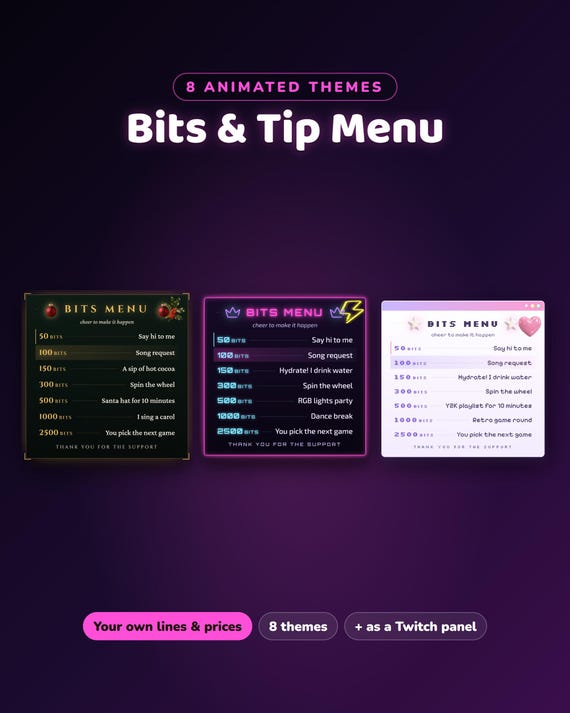
Twitch Bits Menu Overlay
Twitch Bits Menu Overlay, 8 Animated Themes - Tip Menu and Bits Price List for OBS and Streamlabs, Also a Twitch Panel
Same files on every shop — pick the one you like. Instant digital download, nothing is shipped. Watch the setup video below.
Video
Step-by-step setup — more on our YouTube channel.
What you get
Bits menu for your Twitch stream — an animated list of what each amount of bits (or a tip) unlocks: song requests, a hydrate break, you pick the next game… your own lines and prices. 8 themes in one download: Celestial Night, Fireside Christmas, Lavender Lofi, Neon Nights, Pixel Quest, Y2K Desktop, Winter Cabin and Midnight Halloween.
★ Works with OBS Studio and Streamlabs Desktop · also as a picture for your Twitch panels
★ Instant download · no login
★ Free setup help + video guides — we help you until it works on your stream
What's inside
- 8 themed menus — one folder per theme
- configure.html with a live preview → download your personal menu.html → add it as a Browser source (600 × 900)
- START-HERE.pdf guide
Make it yours
- One line per item: «100 | Song request» — a line without | is shown as a heading or a note
- Title, line under the title, bottom line, unit (bits, $ or €) and text size
- A soft glow walks down the rows (you can turn it off)
Want something changed?
A different color or text? Send us a message — we are happy to help.
The Bits Menu and the Spin Wheel also come with our Stream Sets and Full Stream Packages, each in the theme of the set — in our ChatBloomStudio shop.
ALSO FROM US — in the same 8 themes
- Subathon Timer — subs, gifted subs, cheers and raids add time · sub goals · mod commands: Subathon Timer Widget
- Spin Wheel — spins on cheers, subs, gifted subs, raids or !spin: Spin Wheel Widget
Help & video guides
- Step-by-step setup videos on our YouTube channel: youtube.com/@chatbloomstudio — webcam frames, alerts, chat, goal bars, screens, panels, full overlays, bits menu
- Need a video for something else? Ask us — we'll make one for you
- Stuck at any step? Message us — we'll help you until it works on your stream
Good to know
- Digital download — nothing will be shipped.
- Your PC needs internet while streaming (fonts).
- The theme pictures are made with AI image tools; the menu itself is written by us in code. Designed and built by us with the help of AI tools.
- For use on your own channel(s), also monetized. Please don't resell or share the files.
- Twitch, OBS and Streamlabs are trademarks of their owners.