 ChatBloomStudio
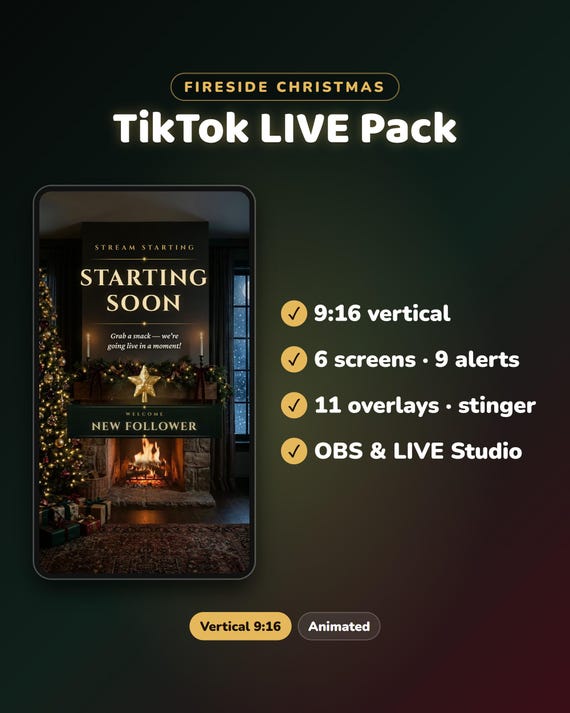
Christmas TikTok Live Overlay Pack
Christmas TikTok Live Overlay Pack, 9:16 Vertical Stream Package, Animated Cozy Fireplace Alerts, Screens, Webcam Frames for OBS
Same files on every shop — pick the one you like. Instant digital download, nothing is shipped. Watch the setup video below.
Video
Step-by-step setup — more on our YouTube channel.
What you get
Christmas TikTok LIVE overlay pack in full vertical 9:16 (1080×1920): a cozy stone fireplace with moving flames, twinkling lights and snow falling past the window. 27 animated pieces that all match.
★ Instant download · 3 zip files · step-by-step PDF guide, about 10 minutes
★ For TikTok LIVE Studio and OBS Studio
★ Tested in OBS Studio on a 1080×1920 canvas and in the TikFinity overlay
★ Free setup help + video guides — we help you until it works on your stream
You need a computer
Overlays go in through streaming software on a computer. They do not work if you go live only from the TikTok phone app. TikTok decides who can go LIVE and who gets a stream key, so check your account first.
What's included
6 ANIMATED SCREENS (MP4 + WebM + PNG, seamless 8.5-second loop)
- Starting Soon
- Be Right Back
- Thanks for Watching
- Currently Offline
- Technical Difficulties
- The room with no text
9 ANIMATED ALERTS (transparent WebM + PNG, 5 seconds each)
- New Follower · New Gift · Big Gift · Top Gifter · New Subscriber
- LIVE Shared · New Likes · Welcome In · Goal Reached
11 OVERLAYS (transparent WebM + PNG)
- 3 layouts with real windows: Game + Cam, Cam + Game, Cam + Chat Box
- 4 webcam frames: full vertical, wide, 4:3 and a round wreath
- Falling snow · String lights · Animated follow bar
- Blank name plate for your own text (PNG)
1 VERTICAL STINGER TRANSITION (transparent WebM, 1.6 seconds)
+ START-HERE.pdf guide with the window sizes in pixels
How to use it
- TikTok LIVE Studio: add a Video source and pick the MP4 of a screen. Add your camera first, then the layout above it. If your version does not play the transparent WebM, use the PNG of the same name with an Image source.
- OBS Studio: set your canvas to 1080×1920, add a Media Source, pick the file and tick Loop.
- Alerts: to show an alert on a follow or a gift you need a tool that connects to your LIVE, for example the free TikFinity. It is made by another company and is not part of this pack. The guide shows the steps.
Want something changed?
A different color or text? Send us a message, we are happy to help.
The same look for Twitch is in our Fireside Christmas Full Stream Package, in our ChatBloomStudio shop.
Help & video guides
- Step-by-step setup videos on our YouTube channel: youtube.com/@chatbloomstudio — webcam frames, alerts, chat, goal bars, screens, panels, full overlays, TikTok LIVE layouts
- Need a video for something else? Ask us — we'll make one for you
- Stuck at any step? Message us — we'll help you until it works on your stream
Good to know
- Digital download: nothing will be shipped.
- 3 zip files: download all 3 and unzip them into the same folder.
- The words in the videos are fixed, in English. To add your name or links, put a text source above a file, or use the name plate and the room with no text.
- The room picture and the flames are made with AI image and video tools; the layouts, lights and animation are built by us in code. Designed and built by us with the help of AI tools.
- For use on your own channel(s), also monetized. Please don't resell or share the files.
- TikTok, TikTok LIVE Studio, OBS Studio and TikFinity are trademarks of their owners. This pack is not affiliated with them.